
Blood Bank Software · November 3, 2026 · Updated November 13, 2026
eRaktKosh Login Guide: Blood Bank, Donor and Thalassemia Login, Step by Step
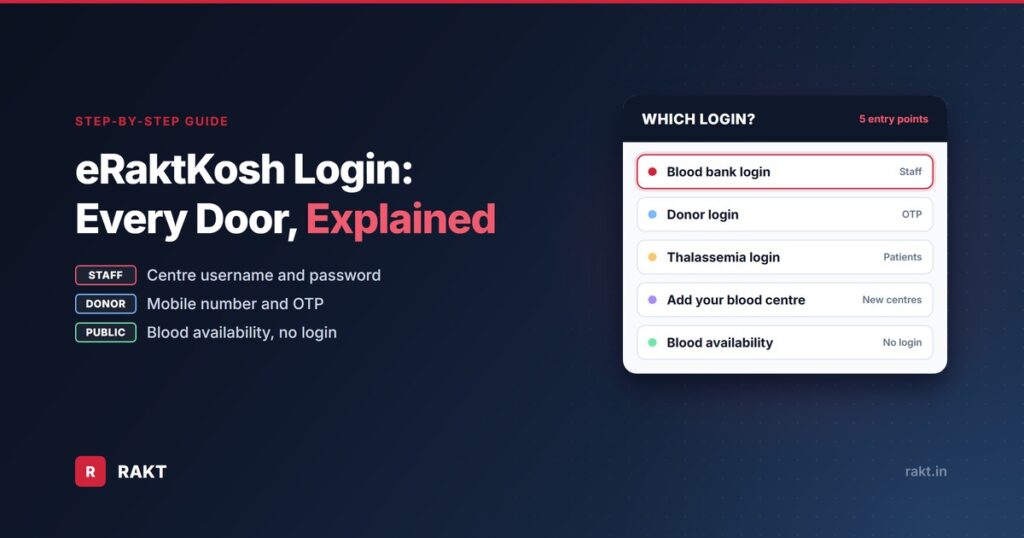
You search for “eRaktKosh login” and land on a portal with five different doors. One is for blood centre staff, one for donors, one for thalassemia patients, one for new blood centres, and one that needs no login at all. Pick the wrong one and the username you were given simply does not work.
For blood centres, getting this right now matters more than ever. In March 2026, CDSCO told its zonal offices and state licensing authorities to check eRaktKosh registration and use during blood centre inspections. It added 11 new points to the inspection checklist, including the centre’s unique eRaktKosh ID, stock consistency and login use.1
This guide takes you to the right door. It shows every eRaktKosh login screen as it looked on 3 November 2026, with numbered steps, plus fixes for locked accounts and forgotten passwords. RAKT is a blood bank software company, not the official portal. The official site is eraktkosh.mohfw.gov.in.
Which eRaktKosh Login Do You Need?
| You are | Use this | What you need |
|---|---|---|
| Blood centre staff | e-Raktkosh Login (Blood Bank Login) | The username and password issued for your centre |
| A blood donor | Donor Login | Your mobile number and a one-time password (OTP) |
| A thalassemia patient or attendant | Thalassemia Login | Registered mobile number, password and captcha |
| A blood centre not yet on eRaktKosh | Add Your Blood Center | Your centre’s address, services and test details |
| A patient’s family looking for blood | Blood Availability | Nothing. No login is needed |
What is eRaktKosh?
eRaktKosh (also written e-RaktKosh or e Raktkosh) is the Ministry of Health and Family Welfare’s centralised blood centre management system. It was developed by C-DAC and launched on 7 April 2016. Blood centres use it to report blood stock, donors and monthly returns. The public uses it to check blood availability, find blood centres and camps, and register as donors.2
It is not optional for licensed blood centres. In June 2022, the Drugs Controller General of India asked every licensed blood centre to register on eRaktKosh, to report stock availability, monthly reports and donor details.3
Where Each Login Lives on the eRaktKosh Homepage
The logins are spread across the homepage. The top menu holds the blood centre options. The donor login and the blood availability search sit lower down, as tiles.
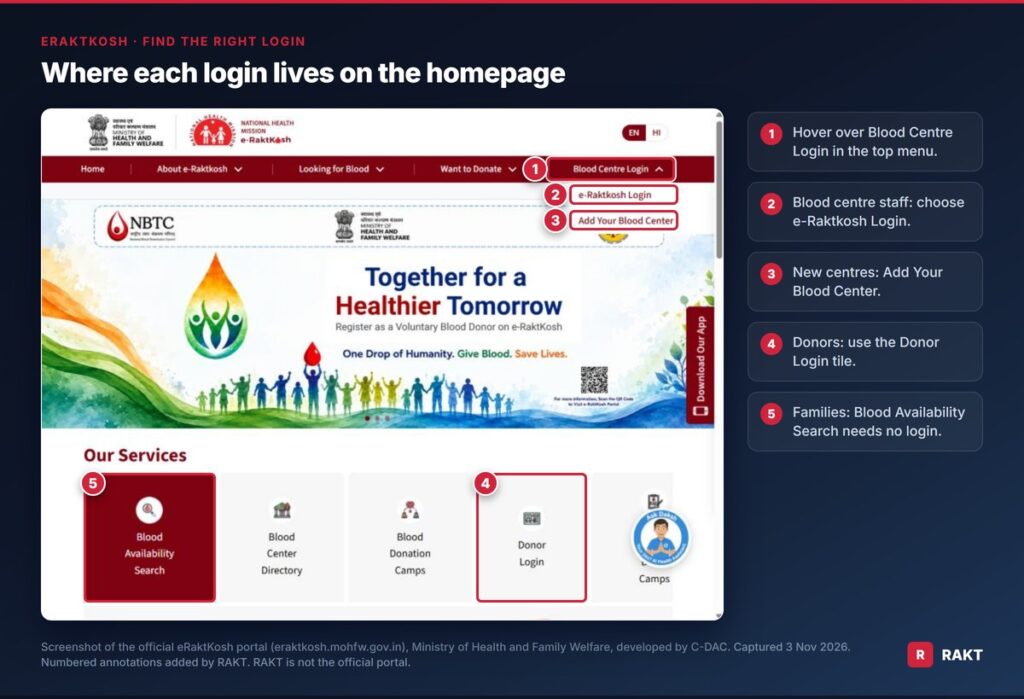
- Hover over Blood Centre Login in the top menu.
- Blood centre staff choose e-Raktkosh Login.
- Centres that are not registered yet choose Add Your Blood Center.
- Donors use the Donor Login tile.
- Families looking for blood use Blood Availability Search. It needs no login.
eRaktKosh Blood Bank Login, step by step
This is the login blood centre staff use to update stock, enter donors and file returns. The screen is titled “Blood Bank Login: Portal/Application”.
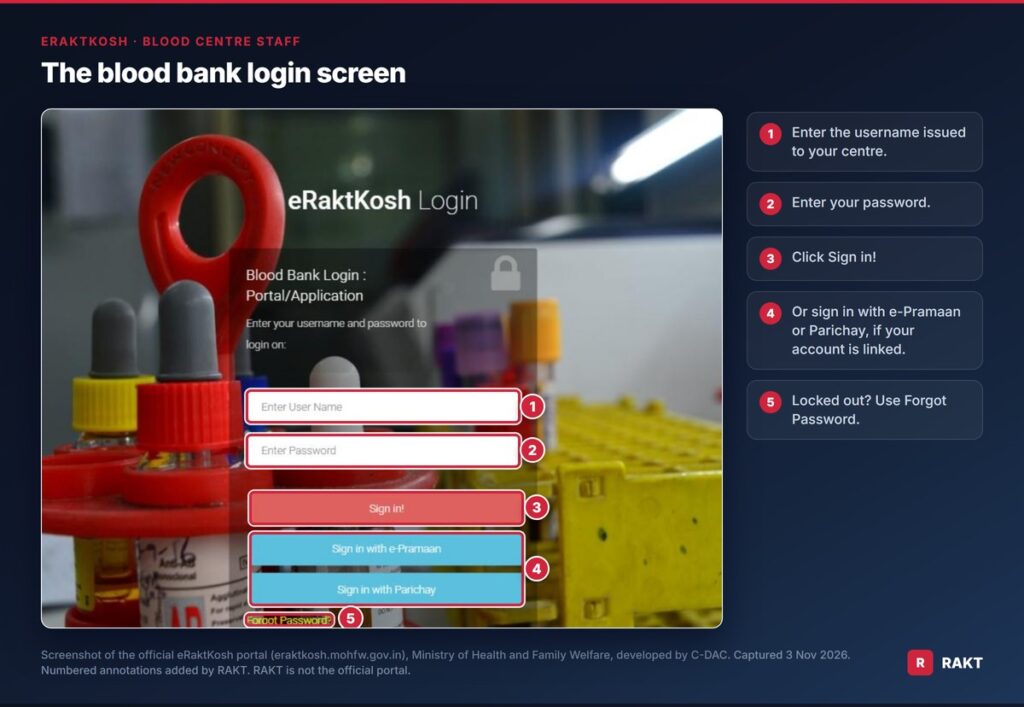
- Open the eRaktKosh blood bank login page, or go to Blood Centre Login, then e-Raktkosh Login.
- Enter the username issued for your centre.
- Enter your password.
- Click Sign in!
- If your account is linked to a government single sign-on, you can use Sign in with e-Pramaan or Sign in with Parichay instead.
The login page also carries a help line for application problems: write to eraktkosh[at]cdac[dot]in.4
Where do the eRaktKosh login ID and password come from?
The portal has no public sign-up for staff logins. Credentials belong to a registered blood centre. So the right fix depends on your situation:
- Your centre is registered, but you were never given the login. Ask the person who manages eRaktKosh at your centre. CDSCO now expects every centre to name the staff responsible for portal data entry.1
- The staff member who had the login has left. Try Forgot Password if the registered mobile number is still with the centre. If it is not, contact eRaktKosh support with your centre’s name, district and licence details.
- Your centre is not registered at all. Start with Add Your Blood Center, below.
One rule for everyone: never share the centre’s eRaktKosh password over WhatsApp or with an outside vendor. Anyone with it can act as your centre on the portal.
In Case You Forgot Password or Account Locked
If your account gets locked, the login page shows: “Your account is locked, please use forgot password to reset your account.” The same reset works for a forgotten password, as long as you still have the registered mobile.
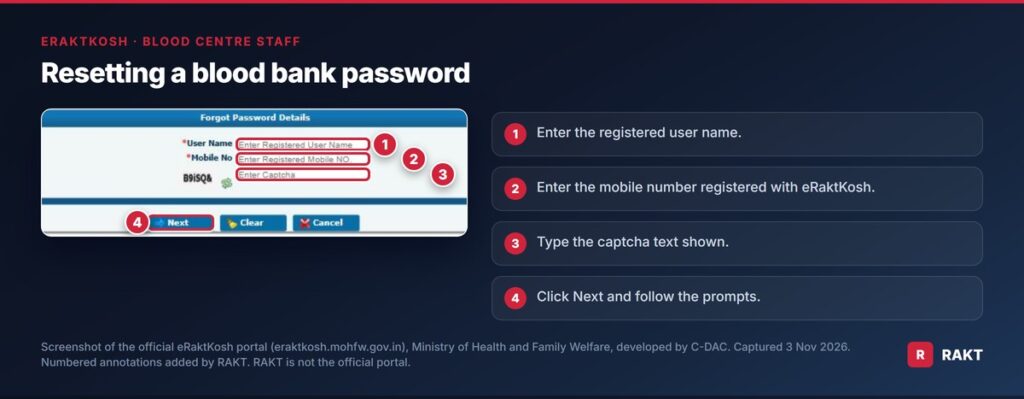
- On the blood bank login page, click Forgot Password? A small form opens.
- Enter the registered user name.
- Enter the mobile number registered with eRaktKosh.
- Type the captcha text shown.
- Click Next and follow the prompts.
If the registered mobile number has changed, the reset cannot reach you. Contact eRaktKosh support instead (details below).
eRaktKosh Donor Login
Donors do not need a password. The donor login works with an OTP sent to your phone.
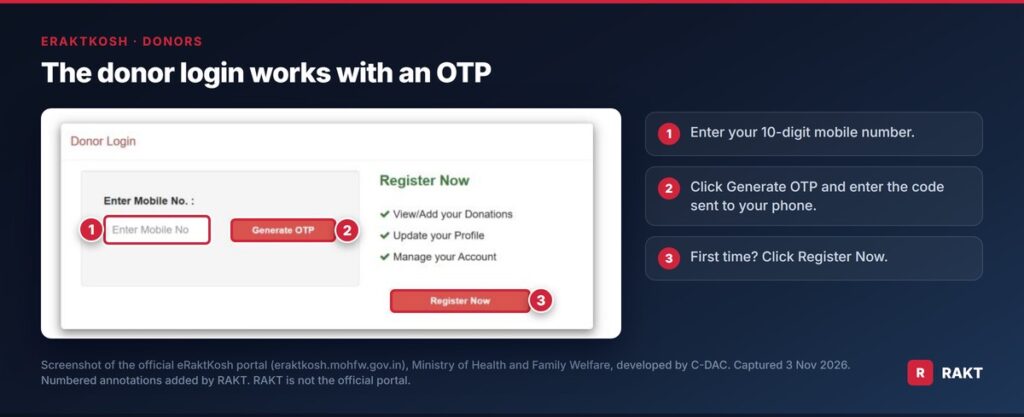
- Open the eRaktKosh donor login.
- Enter your 10-digit mobile number.
- Click Generate OTP and enter the code sent to your phone.
- First time? Click Register Now to create your donor profile.
Once logged in, you can view or add your donations, update your profile and manage your account.4 The minimum age for whole blood donation in India is 18 years.4
Thalassemia Login and Blood Request
Patients with thalassemia need blood again and again. eRaktKosh lets a patient’s attendant request it online from a nearby blood centre, without visiting first.5
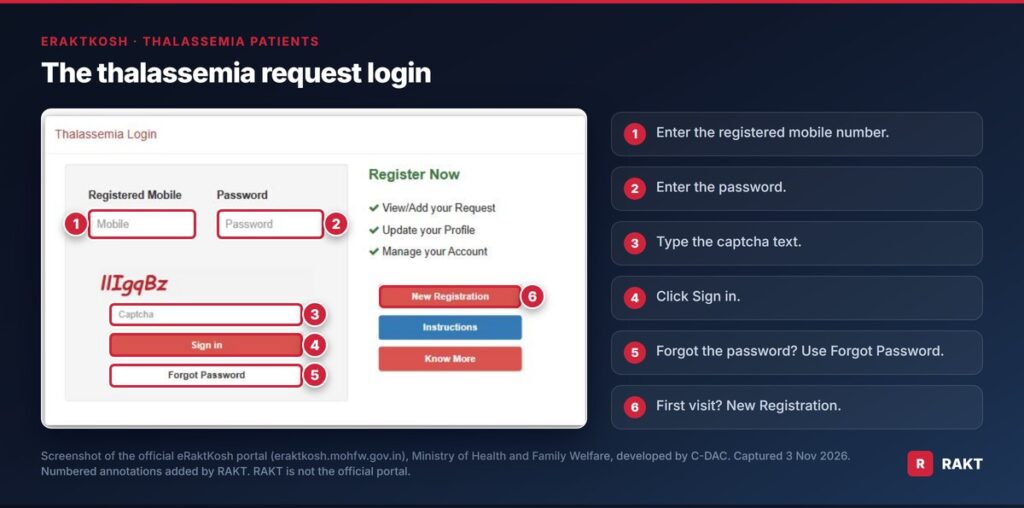
First visit: register and make a request5
- Open the Thalassemia Login and click New Registration.
- Enter the patient’s name, date of birth, gender and email, then a mobile number and password.
- Enter the state, district and pin code. The portal then suggests blood centres near you.
- Choose a blood centre and the patient’s blood group.
- Pick the date blood is needed, the component and the quantity.
- Type the captcha and sign in. Enter the OTP sent to your mobile and click Validate.
The request then goes to the blood centre. You get an SMS once it accepts, based on the units it has.
Next time: log in and track5
- Enter the registered mobile number and password.
- Type the captcha and click Sign in.
- Select the blood centre, enter the quantity and click Save.
- Click View Request to check the status. It starts as Booked and changes to Accepted, Rejected or Partially Accepted once the centre acts.
How to Check Blood Availability on eRaktKosh (No login needed)
This is the tool most families need. It shows which blood centres in a district hold the blood group and component you are looking for.
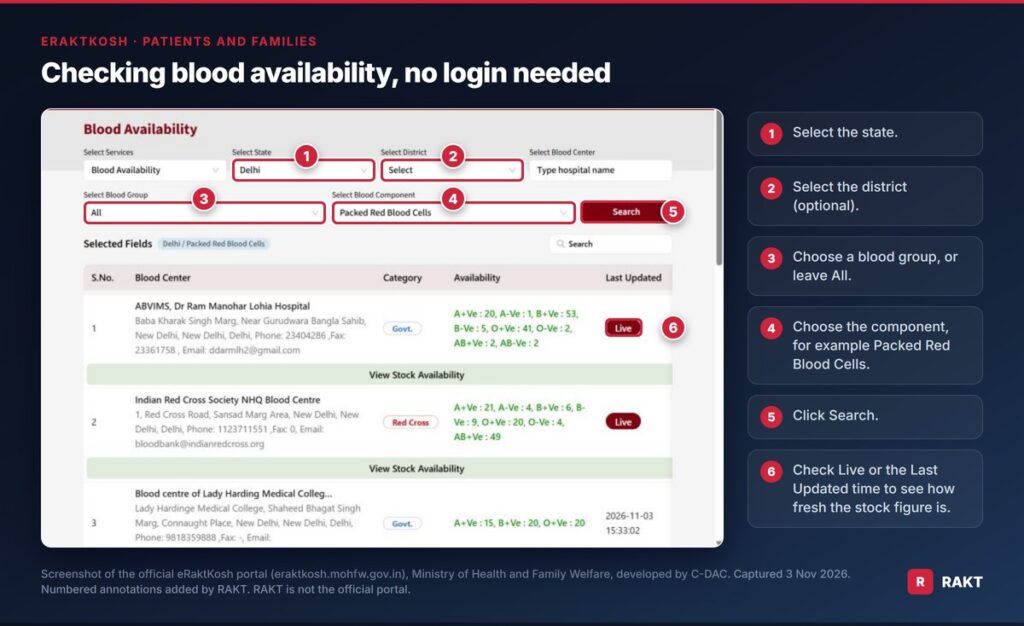
- Open Blood Availability on the portal.
- Select the state. The district is optional but narrows the list.
- Choose a blood group, or leave it as All.
- Choose the component. For a red cell transfusion, choose Packed Red Blood Cells (PRBC). For platelets, change the component to Platelet and search again.4
- Click Search.
- Check the Last Updated column. “Live” or a recent date and time means the figure is fresh.4
Click View Stock Availability under any centre to see units of every component, by blood group.
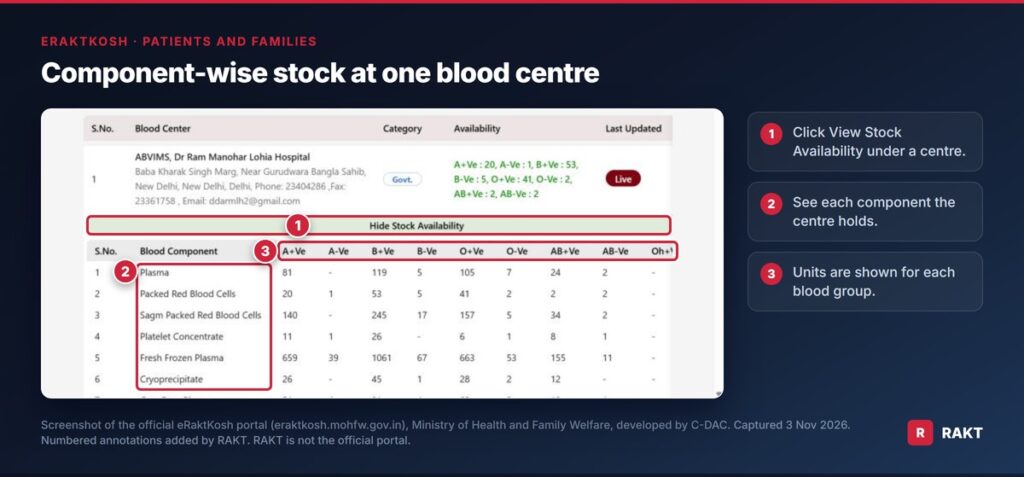
Stock can change between updates, so call the blood centre before you travel. The phone number is listed with each centre. To find the nearest blood centre from where you are, use the eRaktKosh mobile app with location turned on. It lists centres by distance.4 The portal’s footer also links to a blood centre directory and a camp schedule. Many camps accept online pre-registration.4 Some state blood transfusion councils also run their own websites. Our State Blood Transfusion Council guide lists the official ones we could verify, state by state.
Add Your Blood Centre to eRaktKosh
If your centre has no eRaktKosh login yet, registration comes first. The form is public and needs no login.
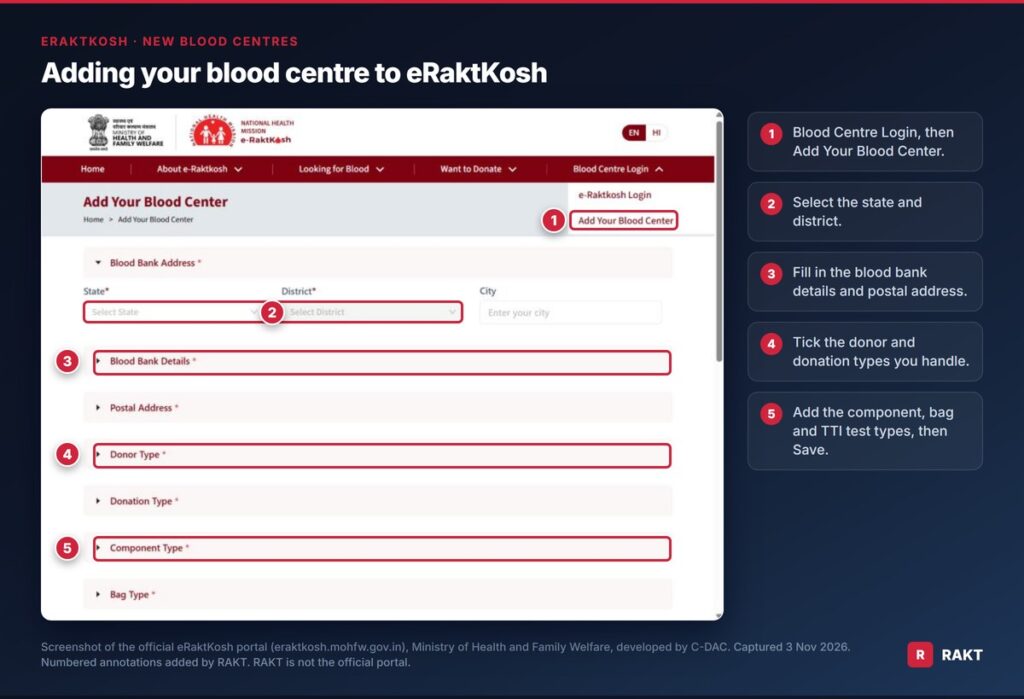
- Go to Blood Centre Login, then Add Your Blood Center.
- Select the state and district, and enter the city.
- Fill in the blood bank details and postal address.
- Tick the donor types and donation types your centre handles.
- Add the component types, bag types and TTI tests you perform. The form lists HIV 1&2, Hepatitis-B, Hepatitis-C, syphilis and malaria.
- Click Save.
Keep your licence at hand while filling it in, since CDSCO expects the licence details on eRaktKosh to be accurate.1 Our guide to Form 28-C, the blood centre licence, explains what those details are. For registration queries, the DCGI’s 2022 advisory pointed centres to the same C-DAC helpline listed below.3
Many centres still have not done this. A Health Ministry review in April 2026 found that “a significant number” of blood centres were yet to be onboarded on eRaktKosh and BBMS.6
What Blood Centres Must Keep Updated After Login
Logging in once a month is no longer enough. Under the CDSCO directions reported in March 2026, every blood centre should:1
- hold a unique eRaktKosh ID;
- keep its licence details, facilities, services and contacts accurate on the portal;
- update blood stock and component availability regularly;
- name the staff responsible for data entry and portal management;
- capture donor details with traceability, linked to an ABHA ID, Aadhaar or another approved identifier where applicable.
Inspectors now check these points, including whether the stock on eRaktKosh matches the centre’s own records.1 Our guides cover the details: eRaktKosh data entry fields, eRaktKosh stock reconciliation and ABHA and eRaktKosh.
Common eRaktKosh Login Problems and Fixes
| Problem | Likely cause | What to do |
|---|---|---|
| “Your account is locked” | Usually repeated wrong passwords | Use Forgot Password on the blood bank login page |
| Username not accepted | Staff details entered on the donor or thalassemia page | Staff credentials work only on e-Raktkosh Login (Blood Bank Login) |
| Password reset fails | The registered mobile number has changed | Email eraktkosh@cdac.in with your centre’s details |
| Donor OTP does not arrive | A typing error, or no donor profile yet | Check the number, then try Register Now if you have no profile |
| No staff login at all | Centre not registered on eRaktKosh | Fill in Add Your Blood Center |
| Stock figure looks old | The centre has not updated recently | Check Last Updated, then call the centre |
eRaktKosh Support and Helpline
For technical problems with the portal or the app, contact the C-DAC team that runs it:4
- Email: eraktkosh@cdac.in
- Phone: +91-9650816031
- Address: C-56/1, Anusandhan Bhawan, Sector-62, Noida, Uttar Pradesh 201307
Administrative queries go to the Blood Cell, National Health Mission, Ministry of Health and Family Welfare, New Delhi 110011.4
Stop Typing the Same Data Twice
Most centres keep their own donor and issue registers, then type the same bags into eRaktKosh again. That second entry is where stock figures drift, and where an inspector finds a mismatch.
RAKT removes the second entry:
- The monthly collection summary is built from the bags, TTI results and issues your staff already recorded. There is no second register for the portal.
- Records are checked against the national schema before sending, so a problem shows up in your queue, not as a rejection weeks later.
- Every accepted record keeps its acknowledgement. Rejected records show the reason and are resubmitted in the next batch.
- Tested stock sits on an endpoint that eRaktKosh polls, which keeps your public availability current between monthly returns.
- Your hospital code and keys stay in your own Settings. No vendor logs in on your behalf.
See how RAKT submits eRaktKosh from your registers, or book a demo on WhatsApp. For the technical setup, read our eRaktKosh integration guide.
Frequently asked questions
How do I log in to eRaktKosh?
Blood centre staff go to eraktkosh.mohfw.gov.in, hover over Blood Centre Login and choose e-Raktkosh Login, then enter the username and password issued for their centre. Donors use Donor Login with an OTP. Thalassemia patients use Thalassemia Login.
How do I get an eRaktKosh login ID and password?
Staff logins belong to a registered blood centre. Ask the person who manages eRaktKosh at your centre. If your centre is not registered, fill in the Add Your Blood Center form first. For other problems, email eraktkosh@cdac.in.
How do I reset my eRaktKosh password?
Click Forgot Password on the blood bank login page. Enter your registered user name, registered mobile number and the captcha, then click Next. If your account is locked, the same Forgot Password option unlocks it.
Do I need to log in to check blood availability on eRaktKosh?
No. The Blood Availability search is public. Select the state, district, blood group and component, then click Search. Check the Last Updated column to see how recent the stock figure is.
How does the eRaktKosh donor login work?
Enter your 10-digit mobile number and click Generate OTP. Enter the code sent to your phone to log in. New donors click Register Now to create a profile.
Is eRaktKosh registration mandatory for blood banks?
Yes. The DCGI asked all licensed blood centres to register in June 2022. In March 2026, CDSCO directed regulators to check eRaktKosh registration and use during inspections.
What is the eRaktKosh helpline number?
The portal lists +91-9650816031 and eraktkosh@cdac.in for support. Administrative queries go to the Blood Cell, National Health Mission, Ministry of Health and Family Welfare, New Delhi.
Is RAKT the official eRaktKosh website?
No. The official portal is eraktkosh.mohfw.gov.in, run by the Ministry of Health and Family Welfare and developed by C-DAC. RAKT is blood bank software that can submit eRaktKosh data from a centre’s own registers.
Sources
- CDSCO goes for strict implementation of registration of blood centres in e-RaktKosh portal. Pharmabiz, 27 March 2026 pharmabiz.com
- Ministry of Health and Family Welfare, C-DAC. About eRaktKosh. eRaktKosh portal, accessed 3 November 2026 eraktkosh.mohfw.gov.in
- Diwe R. Now, registration of blood banks on e-RaktKosh must. The Hitavada, 6 June 2022 thehitavada.com
- Ministry of Health and Family Welfare, C-DAC. eRaktKosh FAQs, contact details and login pages. eRaktKosh portal, accessed 3 November 2026 eraktkosh.mohfw.gov.in
- C-DAC Noida. e-RaktKosh: User Manual of On-line Thalassemia Patient Login eraktkosh.mohfw.gov.in
- Govt targets to establish 1 blood centre in every district by Dec 2026. IANS, 22 April 2026 ianslive.in