
Compliance & Accreditation · July 29, 2026 · Updated October 29, 2026
eRaktKosh Integration: A Practical Guide for Indian Blood Centres
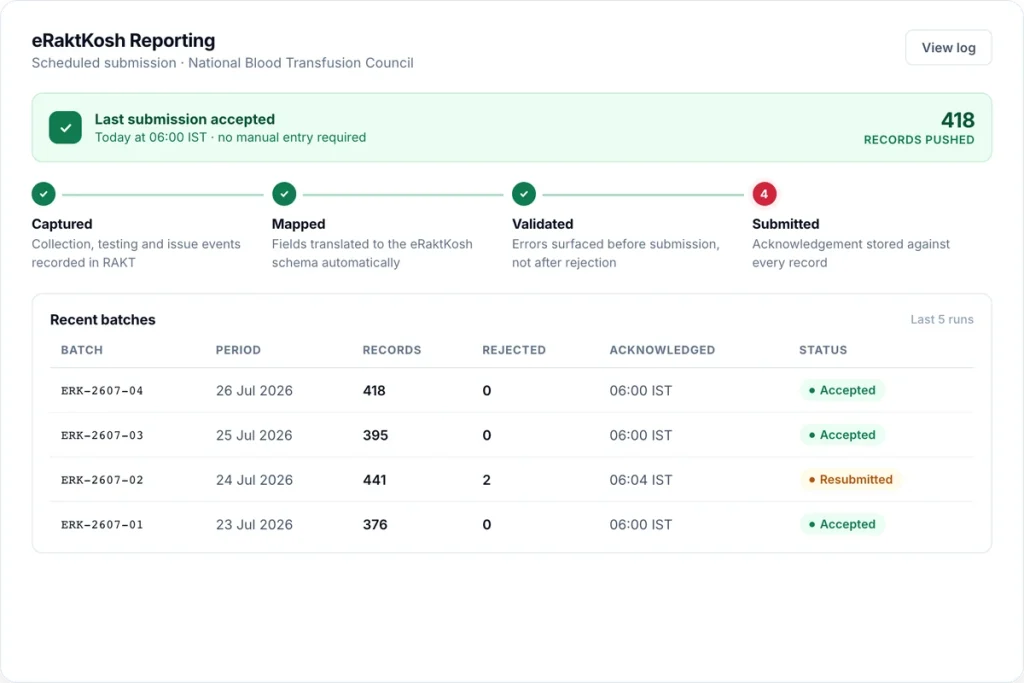
eRaktKosh integration is useful only when your centre can trace every submitted figure back to its own records. eRaktKosh is the national blood bank network run under the Ministry of Health and Family Welfare through the Centre for Development of Advanced Computing, and licensed blood centres across India use it for reporting and blood-stock visibility.1 What varies enormously between centres is how the data gets there, and that difference is usually worth several working days a month, plus the errors that come with doing the same work twice.
This guide covers what eRaktKosh expects from you, the three ways centres actually get data into it, why submissions get rejected, and how to reconcile what the portal holds against your own registers. It is written for the person who actually files the return. For eRaktKosh integration, the useful test is whether you can trace each submitted figure back to the unit identifiers, component status and stock movements recorded at your centre.
What eRaktKosh integration requires from your centre
Your centre needs more than a working eRaktKosh login. Before data can be submitted reliably, the centre account and licence must be correct, the operational records must be complete, local values must be mapped to the current portal fields, and somebody must own every exception returned by the portal. The official access route and logged-in workflow show where your authorised user enters or submits data; they do not decide whether the underlying collection, component, issue, discard or stock record is accurate.2
Treat access, integration and reconciliation as three separate controls. Access establishes that an authorised user can reach the correct centre account. Integration moves data through a permitted portal workflow without retyping it. Reconciliation proves that the data sent agrees with your centre records at the same cutoff.
| Requirement | What your centre must establish | Who should own it |
|---|---|---|
| Official access | The authorised user can reach the current official portal route, and the session identifies the intended centre and licence. | The person responsible for the centre account or the role named in the applicable instruction. |
| Controlled source data | Collections, TTI results, components, stock movements, issues and dispositions come from records that your centre controls and can retrieve by identifier. | The relevant record owner at your centre, not the software vendor. |
| Field and status mapping | Local component names, blood groups, donation types, statuses and other values map to the current portal vocabulary, with an effective date for each mapping version. | A named configuration owner, reviewed by the staff who understand the source records. |
| Cutoff and reconciliation | The local snapshot, outbound data and portal comparison use the same centre, licence, reporting period and cutoff time. | The preparer and reviewer identified in your controlled procedure. |
| Exception review | Rejected rows, partial acceptance, duplicate warnings and unexplained stock differences remain open until somebody traces them to the source record. | A named exception owner with authority to obtain an authorised correction. |
| Submission evidence | The exact file or payload sent, the mapping version, the review record and the acknowledgement or error response are retained together. | The authorised submitter and the person responsible for monthly records. |
Assign data ownership by source rather than by password. Your donor or collection record owner confirms collection figures, the TTI record owner confirms screening counts, the component and inventory owners confirm preparation and stock movements, and the authorised submitter confirms what was actually sent. One person may hold several roles, but an unexplained variance should never sit with “IT”, “the vendor” or “the person who logs in”.
Ask for this evidence before you call the connection live
- A centre and licence check. The vendor or implementation team should show which eRaktKosh centre identity receives the data. If your organisation has multiple centres or licences, each route needs an unambiguous mapping.
- A field mapping. Keep a controlled list showing the local field or status, the submitted value and the mapping’s effective date. A verbal assurance that “the fields match” will not help when a vocabulary changes.
- A reconciled test extract. Choose a controlled date range and compare collections, TTI counts, components, issues, discards and stock with your own records before any live submission.
- An exception demonstration. Ask where a rejected row appears, who can read the portal reason, how the source record is corrected and how the row is resubmitted without duplicating accepted data.
- An evidence package. Confirm that you can retrieve the outbound file or controlled payload, submission time, response, correction history and final result for the same batch.
- A downtime route. Record who monitors failed transmissions, how the failure becomes visible to the centre and what authorised route will be used if the interface is unavailable near the reporting deadline.
Credentials, portal access and a technically successful connection do not transfer data ownership. Your centre approves the source records, your authorised user submits the figures, and your named reviewer decides whether an exception has been properly closed.
Reconcile eRaktKosh stock before submission
Use one fixed cutoff for the local stock snapshot, the submission file and the portal comparison. Before anyone submits, your centre should be able to explain every difference by unit, component, blood group and status. A total that happens to match is not enough if an issued unit remains shown as available while a different available unit is missing.
Keep the source record, outbound data and portal result separate
Build the reconciliation from your centre records outward. First freeze the internal source snapshot at the chosen cutoff. Then generate the outbound file or figures from that snapshot and compare the portal response with exactly what was sent. A spreadsheet prepared for upload is an outbound representation, not a replacement for the Donor Register, TTI Register, Component Preparation Record, Issue Register, Discard & Disposition Register or controlled electronic records that support it.
| Reconciliation layer | Question it must answer | Evidence to retain |
|---|---|---|
| Internal source records | What did your centre record by unit identifier and stock movement at the agreed cutoff? | The dated source extract or retrievable register entries and the extraction time. |
| Outbound representation | What values did your centre intend to submit after applying the current field and status mapping? | The exact file or controlled payload and the mapping version used. |
| Portal result | Which rows or figures did eRaktKosh accept, reject or return with a warning? | The acknowledgement, validation response or error export. |
| Exception queue | Which identifiers still differ, who owns each variance and what correction is authorised? | The reason, owner, source record reviewed, action and resubmission status for each item. |
| Final check | Does the reviewed submission agree with the source snapshot, with every unresolved difference visible? | The signed reconciliation, submission time and final portal response. |
Do not overwrite the first extract after a correction. Retain the original snapshot, record the authorised change in the source, and generate a new outbound version. That sequence lets your reviewer see what differed, why it differed and whether the correction reached the portal without hiding the original exception.
- Confirm the scope. Check the centre account, licence, reporting period and cutoff time. If the organisation has more than one centre or licence, record which one the extract belongs to before opening the portal.
- Freeze the local evidence. Save a dated stock snapshot and the collection, component preparation, issue, transfer, return, expiry and discard movements used to build it. Record the extraction time because live stock can change during reconciliation.
- Compare like with like. Reconcile stock by component and blood group at the same cutoff. Keep units under testing, reserved or otherwise unavailable outside usable stock unless the current portal workflow explicitly maps them into a reported status.
- Investigate exceptions. Trace a variance to the unit identifier and source movement. Check late camp entry, parent and component links, duplicate identifiers, status mapping, a movement posted after the extract, or a rejected row before changing any total.
- Correct the source. If the local record is wrong, make the authorised correction there and regenerate the submission. If the outbound mapping is wrong, correct the mapping and retain the version used for the corrected transmission.
- Review, submit and retain. A named reviewer signs the reconciliation, the authorised portal user submits it, and the acknowledgement or error response is saved with the exact file or payload sent.
Part XIIB and Schedule F Part XIIB provide the licensing and centre-record framework.3 The fields, vocabulary and validation response used for a particular eRaktKosh submission come from the current government portal workflow and any direction applicable to your centre.2
| Exception before submission | What you should investigate | When it is closed |
|---|---|---|
| Portal stock differs from local usable stock | Cutoff time, component and blood-group mapping, late issues, returns, transfers, expiry and discards. | Each unit causing the variance is identified, the correct source is amended and the comparison is rerun. |
| The centre-wide total matches but the component or group split does not | Whether unlike components or blood groups have offset each other in the total. | The stock closes separately by component and blood group. |
| A submission was accepted but the source record changed afterwards | Whether the change belongs in the submitted period and whether an authorised correction or resubmission is required. | The original response, correction decision and any resubmission response are retained together. |
| A row was rejected or only part of a batch was accepted | The exact portal response, the affected identifiers and whether accepted rows would be duplicated by resubmitting the whole batch. | Every rejected row has either been corrected and resubmitted or formally closed with a recorded reason. |
| A locally available unit has another status in the portal representation | Testing completion, reservation, issue, transfer, expiry, discard and the effective mapping version. | The local status and submitted status agree at the same cutoff, or the documented mapping explains the difference. |
| The correct file is attached to the wrong centre, licence or period | The logged-in account, licence identity, reporting period and submission preview. | The file has not been sent under the wrong account, or the competent authority’s correction route has been followed if it was. |
Who reviews and signs off before submission
Use the signatory named in the instruction applicable to your centre. Where no portal-specific instruction names one, your controlled procedure should identify a preparer, a reviewer who signs the reconciliation, and the authorised user who submits through eRaktKosh. Do not leave ownership with “the person who has the password”.
| Role | What that person confirms |
|---|---|
| Preparer | The extract uses the correct centre, licence, period and cutoff; exceptions are traced to source records; corrected data has been regenerated from the controlled source. |
| Reviewer and signatory | Stock closes by component and blood group, unresolved variances are documented, and the submission preview agrees with the signed reconciliation. |
| Portal submitter | The correct account is open, the reviewed file or figures are submitted, and the acknowledgement, rejection or validation response is retained. |
One person may perform more than one role where staffing requires it, but the record should still show who prepared, who reviewed and who submitted. Where staffing allows, use a second-person review before submission. Portal acceptance closes the transmission step; it does not close an unexplained stock variance.
Official eRaktKosh login route
Current official access: start at the official eRaktKosh portal.1 Use the sign-in or blood centre access route displayed there, or the route communicated to your centre by the competent authority. Do not infer a login, password-recovery or account-activation procedure from an unofficial guide when the official portal does not show that procedure.
Older instructions and saved bookmarks may send you to the official eRaktKosh Blood Bank login. If that deep link changes or does not open, do not choose a lookalike result. Return to eraktkosh.in; the earlier official eRaktKosh portal used the eraktkosh.mohfw.gov.in domain. Do not enter your centre credentials on a third-party page that merely reproduces a login form.
After login, first check which centre and licence the session identifies. This matters when one organisation operates more than one centre or holds more than one licence. A correctly prepared file submitted under the wrong centre account creates a reconciliation problem even if the portal accepts the transmission.
Before you submit, verify the reporting period and cutoff time, review the current fields and controlled vocabulary shown by the portal, and compare the preview or outbound file with your centre records.2 Save the acknowledgement, validation error or other portal response with the submission file. Login access tells you where to send the data; it does not transfer responsibility for the figures to the portal, your vendor or RAKT.
What eRaktKosh is, and what it is not
eRaktKosh is a centralised blood bank management and reporting network. It gives the public a view of blood availability across participating centres, gives state and national authorities aggregate visibility of collection, stock and utilisation, and gives each centre a portal through which it reports its own activity.1
It is worth being precise about what that does and does not make it for your centre. For reconciliation and compliance purposes, treat eRaktKosh as a reporting and visibility layer, not as a substitute for your operational and statutory records. The portal will not, by the fact of accepting a submission, prove that an untested unit could not be issued, hold your complete crossmatch record, compute every NABH performance indicator, manage component expiry, or stop the same bag being written into nine separate registers by hand. Those are the jobs of a blood bank management system and your centre’s controlled procedures.
The corollary matters too: for a very small, low-volume centre with one licence and no component preparation, the portal plus genuinely disciplined paper registers can be a defensible arrangement. You should reassess that arrangement when you prepare components, run camps, hold more than one licence, or aim at accreditation, because each additional workflow gives you another place where the portal figure and the supporting record can diverge.
What belongs in eRaktKosh, and what stays in your centre records
Use the national portal for the data and responses that its current workflow requires: centre access, submission or entry, validation responses, acknowledgements and the stock information exposed through eRaktKosh. Your centre records remain the source evidence. They carry the donor and collection entry, test record, parent bag and component link, stock status, issue or discard movement, crossmatch record where applicable, and the authorised correction trail.
| Work in eRaktKosh | Work in your centre records |
|---|---|
| Choose the correct centre account, period and current portal fields. | Confirm that the centre, licence, period and cutoff match the source registers and extract. |
| Submit or enter the figures and review the portal response. | Trace each figure to unit identifiers, component records and stock movements. |
| Retain the acknowledgement, validation error or rejection response. | Investigate the source record, make an authorised correction and retain the evidence. |
| Resubmit a corrected row or file through the permitted workflow. | Correct the record that was wrong. A change made only in an outbound spreadsheet will recur next month. |
| Review the stock position visible through the portal. | Reconcile usable stock by component and blood group at the same cutoff time. |
An acceptance message belongs with the submission evidence, but it does not replace the record that produced the figure. If an assessor asks how a reported discard count was built, you should be able to move from the submitted total to the Discard & Disposition Register and the affected units.
What a centre is expected to report
The precise field list and template have changed more than once and will change again, so treat the following as the shape of the data centres commonly reconcile rather than as a fixed schema reference. Check the current eRaktKosh documentation and the fields visible to your centre before changing a template or interface.2 Do not assign a mandatory field, frequency or validation rule to the portal unless it appears in the current official workflow or in a direction applicable to your centre.
- Centre and licence details: the licensed entity, its category, its address and its licence validity, kept accurate as renewals happen.
- Collection activity: donations by period, split by voluntary and replacement, and by whether they were collected in-house or at an outdoor camp.
- Donor demographics in aggregate, including the age and sex distribution and first-time versus repeat donation.
- Testing outcomes: the mandatory transfusion-transmissible infection screen for HIV, hepatitis B, hepatitis C, syphilis and malaria, reported as counts rather than as identifiable results.
- Component preparation: what was separated from whole blood, by product type.
- Stock position: available units by component and blood group, which is what feeds the public availability view and therefore the part most visibly wrong when it is stale.
- Issue and utilisation: units issued, and the discard count with its cause.
Two responsibilities sit underneath all of this and are easy to miss. First, when your centre publishes a stock position through eRaktKosh, reconcile it at the stated cutoff instead of treating it as an unchecked monthly total. A public availability view that says you hold six units of O negative when you hold none sends a patient’s family to the wrong building. Second, each eRaktKosh figure should be traceable to the statutory registers you keep within the framework of the Drugs & Cosmetics Act, 1940 and under Schedule F Part XII-B (Part XIIB) of the Drugs and Cosmetics Rules, 1945.3 If the two sets of numbers disagree, your centre must identify which source was wrong, correct it through an authorised process and retain the evidence.
The three ways centres get data in
1. Manual entry into the portal
Somebody sits with the registers at the end of the month and types the aggregates into the portal. It requires no software and no integration, which is why most centres start here.
The costs are predictable. It is slow, and it happens late: typically in the last week, by whoever is free that evening rather than by whoever knows the data. It also introduces a class of error that is almost impossible to find afterwards, because the only way to check a typed aggregate is to recompute it from the registers by hand. Worse, it produces a stock position that is accurate on the day it is entered and drifts every day after unless somebody updates it, so the public availability view can become wrong for most of the month by construction.
2. Bulk upload from a spreadsheet
An improvement, and where a lot of centres sit. Data is assembled into the prescribed spreadsheet format and uploaded, which removes the typing but not the assembling. The upload is where most people first meet the validation layer. A date in the wrong format, a blood group written O+ve where the current schema wants O POSITIVE, a component name that does not match the controlled vocabulary, or a unit number that already exists may fail a row or a whole file. Use the actual portal response to establish the cause instead of assuming that a rule from an older template still applies.
The trap is that a bulk upload is still a parallel record. You are maintaining your operational registers and a second representation for the portal, and the two drift. Whenever a correction is made in one and not the other, the reconciliation problem you were trying to avoid is back, with an extra file in it.
3. Integration from your blood bank management system
Your staff already record the bag at collection, the grouping and TTI results, the components separated and the units issued. With a working interface, that record is mapped to the current eRaktKosh schema and submitted without somebody retyping the same values into a second screen.
This is the only one of the three where reporting can become a by-product of the work rather than a second job. It also changes what the failure modes are: instead of typing errors you get mapping and validation errors, which are easier to investigate because they are systematic. A wrong mapping fails the same way every time and is fixed once; a typing error is different every time and may be found by nobody.
If you are evaluating vendors on this, the question that separates real integration from a checkbox is not “do you support eRaktKosh”. It is “what happens when a batch is rejected”. A useful answer names where the rejected records appear, what reason is shown against each, how a correction is made in place, and when it is resubmitted. An answer that amounts to “our support team handles that for you” is a service dependency dressed as a feature, and in March, when their support team is busy, it is your return that is late. How RAKT does this is a reasonable benchmark to hold others to, but no software can guarantee that the portal will accept a transmission or that your centre’s underlying records are compliant.
Why submissions get rejected
Use the reason shown in the current portal response as the authority for an actual rejection. In centre-side validation and interface queues, failures commonly cluster around six things:
- Controlled vocabulary mismatches. Blood group, component name, donation type and deferral reason have to match the values accepted by the current workflow. This is the single largest category in many centre-side queues, and it is a mapping problem, which is why it should be fixed once in configuration rather than corrected row by row every month.
- Date and period errors. A collection date outside the selected reporting period, an expiry before a collection, or a date format the parser rejects. Component expiry computed from the wrong parent bag also shows up here.
- Duplicate unit numbers. Usually a resubmission of something already accepted, or two centres under one licence numbering independently and colliding.
- Arithmetic that does not close. Components separated exceeding collections, issues exceeding available stock, or discards not accounted for. Where the current upload or interface applies internal consistency checks, a centre that maintains its stock position separately from its issue records can trip them repeatedly.
- Missing mandatory fields in the current portal workflow that are optional in your own workflow. Common examples are donor demographic fields and the collection venue on a camp donation, but the live template or response must decide what is mandatory.
- Stale licence or centre details. After a licence renewal, a submission may fail on the centre record rather than on anything in the data, which is a genuinely confusing hour if you are looking only at the rows.
The practical discipline is to validate before you send. Checking records against the current schema locally turns a later rejection into a queue item today. A rejected batch discovered in the following month also means that the month you already closed may not match what the national record holds, so keep it visible until somebody reviews the response and either corrects or formally closes it.
Reconciling the portal against your own registers
Whichever route you use, reconcile. Do it monthly, before the next period opens, and do it on four figures:
- Collections in your Donor Register against collections in the submission, split by voluntary and replacement and by in-house and camp. Camp collections are where this most often diverges, because camp data is the most likely to have been entered late.
- TTI results in your TTI Register against reported screening counts. A mismatch here usually means reactive units were handled outside the normal flow or that the two extracts used different cutoffs.
- Components prepared against your Component Preparation Record. One collection becoming three or four products is the most common source of double counting in either direction.
- Issues and discards against your Issue Register and Discard & Disposition Register. Discards are the figure most often understated, because a discard is a small administrative act at the end of a shift and the register entry gets deferred.
If your system can produce that comparison for an arbitrary date range, this can be a ten-minute job. If it cannot, it can consume a day, which is why it does not get done and why the discrepancy is later found during a review or inspection. The local records remain the evidence supporting the figures sent to eRaktKosh under the Schedule F Part XII-B framework.
What to check before eRaktKosh submission or integration
Start below the monthly totals. Use the same centre, licence, reporting period and cutoff time on both sides, then trace the submitted data through unit identifiers, component status, stock movement and final disposition. The current portal documentation and logged-in workflow tell you what eRaktKosh will accept; Schedule F Part XII-B tells you why the supporting centre records still matter.23
| Reconciliation point | What your centre should verify | Evidence to retain when records differ |
|---|---|---|
| Unit identifiers | Each submitted unit number matches the local donor and collection record. Components remain linked to the correct parent bag, and the same identifier has not been reused by another collection point or centre under the licence. | The source extract, rejected row or error response, the local record reviewed and the corrected submission response. |
| Component status | Each component’s local status maps to the intended portal status. Review units under testing, available, reserved, issued, transferred, expired or discarded instead of comparing only the final available count. | The local status history, the mapping version used for submission and any authorised correction entry. |
| Stock movement | Opening stock and additions close against issues, transfers, discards and closing stock for the same date range. Account separately for units that were prepared but were not yet available at the cutoff. | A dated stock snapshot and the movement report or registers from which each side of the calculation was taken. |
| Rejected or discarded units | A portal-rejected row stays in the resubmission queue, while a unit discarded at your centre stays in the Discard & Disposition Register with its cause and approval. One must never be mistaken for the other. | The portal rejection reason and resubmission result for a rejected row; the local disposition record, cause and approval for a discarded unit. |
| Variance closure | The correction is made in the source record that was wrong. Changing only a spreadsheet or outbound interface file leaves the next submission ready to repeat the discrepancy. | A variance note identifying the cause, the person who reviewed it, what was corrected, and the before-and-after portal response. |
Status names in your own system may differ from the current portal vocabulary. Record the mapping in configuration, including its effective date, so that a technician can explain why a local status produced a particular submitted value. If the vocabulary changes, preserve the previous mapping with the submissions that used it.
For stock, run the movement equation by component and blood group, not only as one centre-wide total. Opening usable stock plus components prepared, received or returned should account for issues, transfers out, discards and closing usable stock, with units not yet available handled separately. A total that closes only after unlike components or groups are pooled can hide the exact unit that moved incorrectly.
When portal and local records differ, keep the original submission file or controlled payload, the portal acknowledgement or error export, the local record reviewed, the correction note and the resubmission response together. Record the extraction time as well as the date. Otherwise, a live stock view may have changed between the two exports and you will be trying to explain a variance created by the comparison itself.
An accepted upload or successful integration response proves that the portal accepted that transmission. It does not prove that your Donor Register, TTI Register, Component Preparation Record, Issue Register or Discard & Disposition Register is complete, nor does it prove compliance with Schedule F Part XII-B. Your centre remains accountable for those records and for explaining any difference.
eRaktKosh and ABDM are not the same obligation
These get conflated constantly, and they pull in different directions. eRaktKosh is reporting: aggregate activity and stock, flowing from you to the national record. ABDM, the Ayushman Bharat Digital Mission, is identity and interoperability: a framework through which a donor’s or patient’s records can be recognised across the health system. ABHA is the individual health account and identity inside it.4
For a blood centre the practical difference is that eRaktKosh integration affects your reporting workload, while ABHA affects your registration desk and the identity used when records follow a donor between participating systems. Deferral history remains a donor-safety matter and not a paperwork one. Both are moving in the same policy direction, and both are considerably cheaper built in than retrofitted onto a system that was not designed for them.
A checklist before your next submission
- Start from the official
eraktkosh.inportal and use the current access route displayed there. - If an approved centre instruction still points to the
eraktkosh.mohfw.gov.inlogin route, open it only from that official instruction or domain and confirm that the session shows the intended centre and licence. - Centre and licence details current, including validity dates after any renewal.
- Reporting period and cutoff time identical in the local extract, submission file and reconciliation report.
- Blood group, component, donation type and deferral vocabularies mapped to the values the current schema accepts, checked once in configuration rather than per row.
- Camp collections entered and reconciled into centre stock before the period closes.
- Component preparation derived from parent bags, so separation cannot exceed collection.
- Discards recorded with cause and approval, not left to the end of the month.
- Validation run locally before submission, with failures queued and reasons visible.
- The portal response for each submission saved with your monthly file, so you can evidence what was filed and when.
- The four-figure reconciliation above completed and any variance explained in writing.
- Unit identifiers checked for duplicates, missing parent bags and corrections made only in the outbound file.
- Local component status compared with its mapped portal status at the same cutoff time.
- Opening stock, additions, issues, transfers, discards and closing stock reconciled by component and blood group.
- Portal-rejected rows separated from units physically rejected or discarded at your centre.
- Original submission, portal response, correction evidence and resubmission response retained together when the records differ.
- The submission preview compared with the signed reconciliation before the authorised user sends it.
- The preparer, reviewer and portal submitter identified in the monthly submission record.
- Unresolved variances held for investigation instead of being cleared only because the portal accepts the file.
None of this is difficult. It is work that compounds when the reporting representation and the operational record are separate, and reduces when the same controlled source can produce both. Even then, a named person at your centre must review the figures, submit them through the correct login and close any variance.
eRaktKosh: the questions we are asked most
Where do we log in to eRaktKosh?
Start at the official eRaktKosh portal and use the current access route displayed there. Older centre instructions may use the official eRaktKosh Blood Bank login. If the direct page has moved, go to eraktkosh.mohfw.gov.in only where that official route remains applicable, or return to eraktkosh.in. Before submitting, confirm that the session shows your intended centre and licence, then check the reporting period, cutoff, current field requirements and submission preview against your local records.
What is the name of the online platform for blood bank management in India?
It is eRaktKosh, the national centralised blood bank management and reporting network. It gives the public a view of blood availability across participating centres, gives state and national authorities aggregate visibility of collection, stock and utilisation, and gives each licensed centre access to a portal through which activity can be reported.
Is eRaktKosh a blood bank management system?
eRaktKosh is described as a centralised blood bank management and reporting network, but portal acceptance is not a substitute for the operational controls and statutory records at your centre. It does not, by accepting a submission, prove that an untested unit could not be issued, hold your complete crossmatch record, compute every NABH performance indicator, manage component expiry, or stop the same bag being written into nine separate registers by hand. Those controls belong in your procedures and, where used, a blood bank management system.
Is eRaktKosh reporting mandatory, and is it free?
The official portal is publicly accessible without a software-integration purchase, and integration is not established as mandatory by Schedule F Part XIIB. Do not use this page alone to decide whether a current reporting direction applies to your licence. Check the instruction issued to your centre by the competent authority and the current official portal workflow. You may type aggregates straight into the portal where that route is available. For a very small, low-volume centre with one licence and no component preparation, the portal plus genuinely disciplined paper registers can be a defensible arrangement. Reassess it when you prepare components, run camps, hold more than one licence, or aim at accreditation.
Why do eRaktKosh submissions get rejected?
Read the portal response first, because the current workflow decides why a particular row failed. Common centre-side causes are controlled vocabulary mismatches, dates in the wrong format or outside the reporting period, duplicate unit numbers, arithmetic that does not close such as components separated exceeding collections, fields marked mandatory in the current workflow but optional in your own system, and stale licence details after a renewal. For example, O+ve may fail where the current schema wants O POSITIVE. Fix a mapping in configuration instead of correcting the same rows every month.
Does the eRaktKosh return have to agree with my own registers?
Your centre should be able to reconcile every submitted figure with the statutory records kept under the Drugs & Cosmetics Act, 1940 framework, specifically Schedule F Part XII-B (Part XIIB) of the Drugs and Cosmetics Rules, 1945. If two sets of numbers disagree, identify the source of the difference and retain the correction evidence. Stock also needs a stated cutoff: a public availability view saying you hold six units of O negative when you hold none sends a patient’s family to the wrong building.
What should we check before an eRaktKosh submission or integration?
Check the same centre, licence, period and cutoff on both sides. Then reconcile unit identifiers, parent bag and component links, component status, opening and closing stock movements, issues, transfers, rejected rows and discarded units. If portal and local records differ, retain the original submission, portal response, local record reviewed, correction note and resubmission response together. Portal acceptance confirms transmission; it does not prove that your Schedule F records are complete or compliant.
Who should sign off the reconciliation before submission?
Use the signatory named in the instruction applicable to your centre. If no portal-specific instruction names one, your controlled procedure should identify who prepares the extract, who reviews and signs the reconciliation, and who submits through the authorised eRaktKosh account. The signed record should show the centre, licence, period, cutoff, unresolved exceptions and the submission response.
Sources
- eRaktKosh official portal eraktkosh.in
- eRaktKosh authorised-user documentation and logged-in Blood Bank workflow eraktkosh.mohfw.gov.in
- Central Drugs Standard Control Organisation, Drugs and Cosmetics Act and Rules cdsco.gov.in
- Ayushman Bharat Digital Mission official website abdm.gov.in